
Table of Contents
- How to Buy Quality Gadgets Online: Essential Steps
- How to Spot Fake Electronics Before You Buy
- Best Places to Buy Electronics Online with Confidence
- How to Read Electronics Product Reviews Effectively
- Secure Payment Methods and Data Protection for Online Shopping
- Return Policies, Warranties, and Post-Purchase Protection
- Shipping, Tracking, and Delivery Considerations
- Common Mistakes to Avoid When Buying Gadgets Online
Last Updated: August 4, 2026
When shopping for gadgets online, you're spending real money on products you can't touch from sellers you've never met. Counterfeit electronics and poor quality are genuine risks. At Johnny Kash & Carry Co., we've helped thousands of shoppers navigate this challenge and learned what separates smart purchases from costly mistakes.
This guide covers how to buy quality gadgets online with confidence: identifying what you need, verifying seller authenticity, spotting fakes, reading meaningful reviews, and protecting your data during checkout.
How to Buy Quality Gadgets Online: Essential Steps
The biggest mistake people make is skipping research entirely. Start by defining exactly what problem you're solving. Write down 2-3 specific features that matter to you, not vague wishes like "good quality," but concrete requirements like "wireless connectivity" or "fits in a kitchen drawer."
Next, research specifications and compare options across multiple retailers. Cross-reference specs on manufacturer websites, read independent reviews, and check what actual customers say about durability. Finally, verify seller authenticity before committing. Check how long they've been in business, review their return policy, and confirm legitimate contact information. A seller hiding behind a generic email or offering no contact method is a warning sign. At Johnny Kash & Carry Co., we prioritize transparency, our real support is available seven days a week, and our fast, tracked shipping means you can see exactly where your order is at any moment.
Step 1: Identify What You Actually Need
Before searching, get specific about what you're buying and why. Ask yourself: What problem am I solving? Is this a replacement or a new tool? How much space do I have? What's my realistic budget?
Write down your answers. Instead of "I want a home organization gadget," write "I need a drawer organizer that fits my kitchen junk drawer (14 inches wide, 4 inches deep) and holds charging cables and small tools without taking up counter space." Now you have a filter to evaluate products immediately.
Step 2: Research Hardware Specifications and Compare Options
Gadget specifications tell you what a product can actually do. Start with the manufacturer's official specifications, these are usually more accurate than retailer descriptions. Look for: dimensions and weight, battery life or power requirements, connectivity options (Bluetooth, USB-C, WiFi), device compatibility, and warranty coverage.
Compare the same product across at least three retailers. You'll often find different prices, descriptions, and occasionally different product versions. Read the fine print on technical specifications. A gadget advertised as "waterproof" might actually be "water-resistant up to 3 feet for 30 minutes."
Step 3: Verify Seller Authenticity and Reputation
Before entering your payment information, verify the seller is legitimate. Check how long they've been operating. New sellers with zero history are higher risk than established ones. Look at their business registration information if available, legitimate retailers usually display this. At Johnny Kash & Carry Co., we've built trust through consistent delivery and real customer support over time.
Read recent customer reviews on independent platforms like Google Reviews and Trustpilot, not just the seller's website. Look for patterns: Are customers consistently happy? Are there recurring complaints about product quality, shipping delays, or poor service?
Verify contact information exists and works. Send a test email or call before you buy. If they don't respond within 24 hours, or if contact information is obviously fake, that's a red flag. Check their return and refund policy explicitly. Legitimate sellers make this easy to find and understand.
How to Spot Fake Electronics Before You Buy
Counterfeit electronics are a real problem in online retail. Fake products might look identical to genuine items but fail within weeks or pose safety risks.
Red Flags That Signal Counterfeit Products
Pricing drastically lower than everywhere else is the first warning sign. If a brand-new gadget costs $200 at official retailers but $40 on an unknown website, it's counterfeit, not a deal. Legitimate discounts exist but are usually 10-20% off, not 75%.
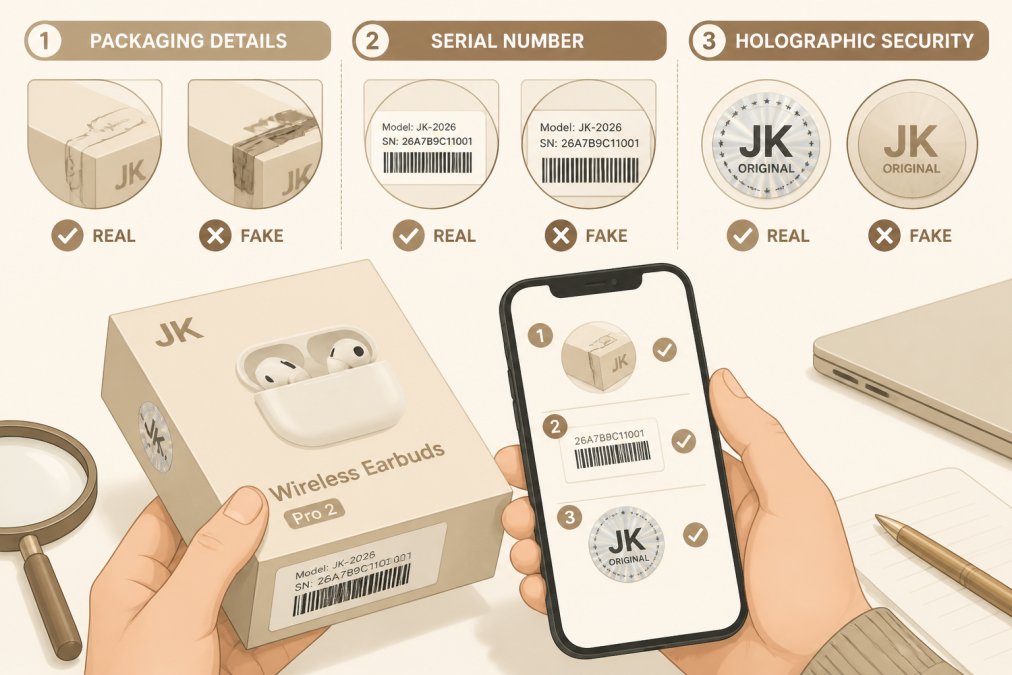
Packaging quality matters. Genuine products have professional packaging with clear printing, proper spelling, and consistent branding. Counterfeit packaging often has blurry logos, spelling errors, or inconsistent colors.
Serial numbers and authenticity codes are easy to verify. Most legitimate electronics include a serial number you can check on the manufacturer's website. If the serial number doesn't register or multiple products have identical numbers, the items are fake.
The seller's story doesn't add up. If they claim to be an "authorized reseller" but have no verifiable relationship with the manufacturer, that's suspicious.
Checking Product Authenticity Through Manufacturer Verification
Most major electronics manufacturers offer authentication tools on their websites. Apple, Samsung, Sony, and others let you enter a serial number or scan a QR code to verify authenticity.
Check the QR code on packaging. Scan it and verify it takes you to the legitimate manufacturer's website. Counterfeiters sometimes print fake QR codes linking to convincing knockoff sites.
Look for holographic security features if included. Genuine holographic stickers are difficult to replicate and have specific visual properties. If the hologram looks flat or doesn't change when tilted, it's likely fake.
Contact the manufacturer directly if unsure. Send a photo of the serial number and ask if it's registered to an authorized retailer.
Best Places to Buy Electronics Online with Confidence
Established marketplaces with strict seller verification are safer than open platforms. Amazon, Best Buy, B&H Photo, and Newegg verify sellers and offer buyer protection guarantees. If you receive a counterfeit product, these platforms will refund you or send a replacement.
Direct-from-manufacturer websites eliminate the middleman. Buying directly from Samsung, Apple, or Sony guarantees authenticity and usually includes the full manufacturer warranty.
Authorized resellers are legitimate but require verification. A retailer claiming to be "authorized" should display that authorization clearly and provide verification.
What Makes an Online Marketplace Trustworthy
Trustworthy marketplaces make seller verification transparent. They display seller ratings prominently, require verified contact information, and have clear policies about removing bad sellers.
Buyer protection guarantees matter. The marketplace should offer refunds if you receive counterfeit products or items don't match the listing. Johnny Kash & Carry Co. makes returns easy because we stand behind our products. We know customers are more likely to buy when they trust they can return something if it doesn't work out.
Customer service responsiveness is a practical filter. Contact the marketplace's support team with a question before you buy. How fast do they respond? Is the answer helpful?
How to Read Electronics Product Reviews Effectively
Reviews are valuable but often manipulated. Learning to separate genuine feedback from fake reviews prevents buying low-quality products.
Spotting Fake vs. Genuine Customer Feedback
Fake reviews follow patterns. They use generic language ("Great product!" / "Highly recommend!") without specific details. They appear in clusters, suddenly a product gets 20 five-star reviews in one week, then nothing for months.
Genuine reviews mention specific details. A real customer writes, "I've been using this for three months and the battery lasts about 8 hours with moderate use, which is less than advertised but acceptable for the price." They mention both positives and negatives.
Look at the reviewer's history. If someone has written 50 five-star reviews for 50 different products, they're likely fake. Check review dates. Recent reviews are more relevant than old ones because product quality sometimes changes.
What Real User Feedback Actually Tells You
Real reviews reveal both strengths and weaknesses. A product with all five-star reviews is suspicious. Real products have trade-offs.
Look for reviews mentioning specific use cases. "Perfect for organizing my small apartment kitchen" is more useful than "Great product." Pay attention to reviews mentioning durability over time. A gadget that works great for the first week but breaks after two months is a problem only visible in reviews written weeks or months after purchase.
Read critical reviews carefully. If multiple one-star reviews mention the same issue, that's a genuine problem.
Secure Payment Methods and Data Protection for Online Shopping
Your payment information is valuable. Protecting it during checkout requires understanding encryption, recognizing secure payment indicators, and using payment methods that offer fraud protection.
Cybersecurity Hygiene: Protecting Yourself During Checkout
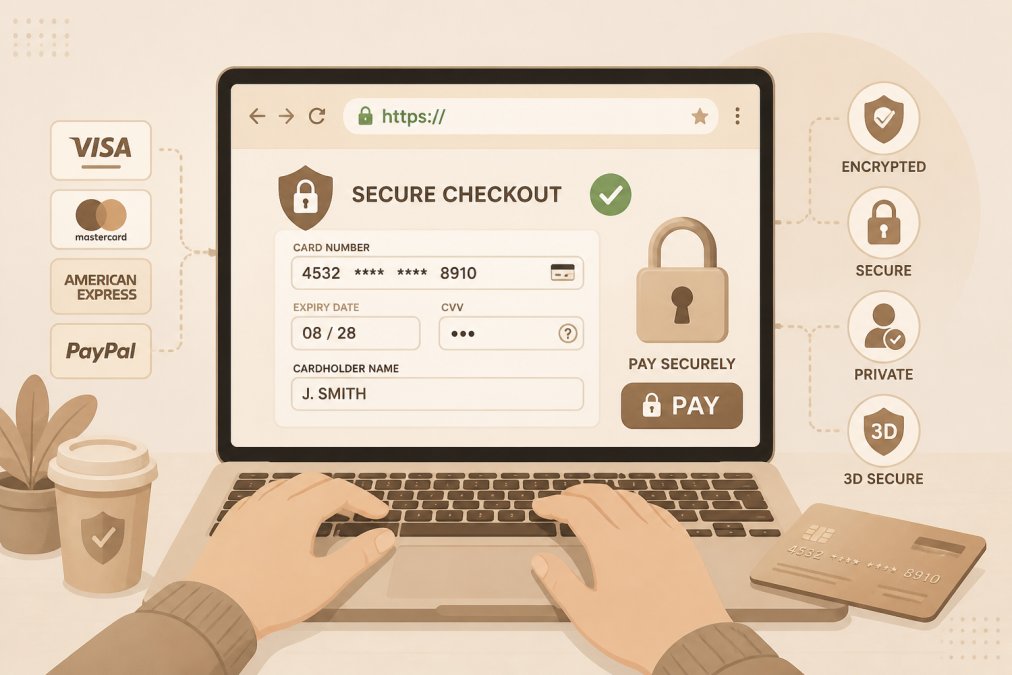
Before entering payment information, verify you're on a secure connection. Look at the URL, it should start with "https://" not "http://". The "s" stands for secure. If you're on an http:// site asking for payment information, stop immediately.
Look for the padlock icon in your browser's address bar. This indicates an encrypted connection. Use a strong, unique password for each online retailer. Password managers like 1Password or Bitwarden generate and store strong passwords.
Don't use public WiFi for online shopping. Public WiFi networks aren't encrypted, so hackers can potentially intercept your payment information. If you must shop on public WiFi, use a VPN (Virtual Private Network) to encrypt your connection.
Understanding Encryption and Secure Transaction Indicators
Encryption scrambles your data so only the retailer can read it. When you see "https://" and a padlock icon, encryption is active.
Look for security badges from recognized certification authorities like Norton Secured, McAfee Secure, and Trustwave. Understand "PCI compliance", a security standard that retailers handling credit card payments must follow. Legitimate retailers display their PCI compliance status.
Use payment methods that offer fraud protection. Credit cards offer the strongest protection, if fraud occurs, you can dispute the charge and the credit card company investigates. Digital payment methods like PayPal or Apple Pay add an extra layer of security by not sharing your actual payment information with the retailer.
Return Policies, Warranties, and Post-Purchase Protection
A good return policy is your safety net. If a product doesn't work as advertised or arrives damaged, you need a clear path to resolution.
What to Look for in Warranty Coverage and Manufacturer Support
Manufacturer warranties vary significantly. Some cover defects for one year, others for two years. Some cover accidental damage; others cover only manufacturing defects. Read warranty terms before you buy.
Check what "defect" means in the warranty. Does it cover a battery that stops holding a charge after 18 months? Manufacturer warranties are usually narrower than expected, they cover failures due to manufacturing problems, not wear and tear.
Extended warranties are optional but worth considering for expensive items. A $200 gadget with a two-year extended warranty might cost an extra $30-40. Verify that manufacturer support is available in your country.
Evaluating Return Policies Before You Commit
A 30-day return window is standard. Some retailers offer 60 or 90 days, which is better. Check whether the retailer covers return shipping or if you pay for it. Free return shipping is a significant advantage.
Look for restocking fees in the fine print. Some retailers charge 10-15% restocking fees on returned items. Check whether returns require original packaging and all accessories. Understand the return process. Can you return items in-store or only by mail? How long does the refund take after the retailer receives your return?
Shipping, Tracking, and Delivery Considerations
How your gadget gets to you matters as much as where you buy it. Poor shipping practices result in damaged products and lost packages.
Understanding Order Tracking and Delivery Insurance
Tracked shipping means you can see where your package is at any moment. This is standard for reputable retailers. Untracked shipping means you have no visibility into whether your package has left the warehouse or been lost. Avoid retailers offering only untracked shipping for valuable items.
Real-time tracking updates show your package's location and estimated delivery date. Johnny Kash & Carry Co. provides tracked shipping on every order because we know customers want visibility into their purchase.
Delivery insurance covers the package if it's lost or damaged during shipping. For expensive gadgets, delivery insurance is worth the cost. Signature confirmation requires someone to sign for the package. For valuable items, signature confirmation is worth requesting.
Protecting Fragile Electronics During Transit
How electronics are packaged determines whether they arrive intact. Poor packaging leads to damage that might not be immediately obvious.
Check the retailer's packaging standards. Do they use adequate padding? Read shipping reviews to see if customers report receiving damaged products. Photograph the package when it arrives. Take photos of the exterior showing any damage and photos of the contents. File damage claims immediately. If you receive a broken gadget, contact the retailer within 24 hours.
Common Mistakes to Avoid When Buying Gadgets Online
Buying based on social media hype alone. A gadget trending on TikTok might be genuinely useful or a passing fad. Buy based on whether it solves a real problem for you.
Skipping the specifications review. Reading specifications takes 10 minutes and prevents buying the wrong product.
Trusting seller ratings without reading recent reviews. Read the 20 most recent reviews to see if quality has changed.
Buying from unfamiliar sellers without verification. Verify seller authenticity before buying from unknown sources.
Ignoring return policies. Check return policies before committing.
Paying with payment methods that don't offer fraud protection. Wire transfers and cryptocurrency offer no protection. Credit cards and PayPal offer dispute resolution.
Buying the cheapest option without considering warranty coverage. A $40 gadget with no warranty might be more expensive than a $60 gadget with a two-year warranty.
Assuming all online retailers are equally safe. Established retailers with strong reputations are worth the extra cost.
| Mistake | Impact | Prevention |
|---|---|---|
| Buying based on hype alone | Wasted money on products you don't use | Verify the gadget solves a real problem for you |
| Skipping specifications | Product doesn't match your needs | Read full specs before purchasing |
| Trusting old reviews | Recent quality issues go unnoticed | Read the 20 most recent reviews |
| Unknown seller without verification | High risk of counterfeit products | Check seller history and contact info |
| Ignoring return policies | Stuck with defective products | Read return policy before checkout |
| Unsafe payment methods | No fraud protection if something goes wrong | Use credit cards or PayPal |
| Cheapest option only | Higher total cost due to lack of warranty | Compare warranty coverage with price |
| Unfamiliar retailers | Increased fraud and counterfeiting risk | Buy from established, verified retailers |
Buying quality gadgets online doesn't require perfection, it requires a process. Define what you need, research specifications, verify seller authenticity, read genuine reviews, protect your payment information, and understand your return options. At Johnny Kash & Carry Co., we've built our business around these principles. Our secure, encrypted checkout protects your data, our fast tracked shipping gives you visibility into your order, and our easy returns process means you can shop with confidence knowing we stand behind what we sell.
Frequently Asked Questions
How do I know if an online electronics store is legitimate when buying gadgets online?
Check for clear contact information, physical address, and customer service availability. Look for secure payment options with data encryption, SSL certificates (padlock icon in the browser), and trusted payment gateways. Read recent customer reviews across multiple platforms to verify seller reputation. Legitimate retailers display manufacturer warranties, clear return policies, and belong to consumer protection organizations. Avoid sites with vague product descriptions, unusually low prices, or poor grammar in their listings.
What should I look for when reading electronics product reviews before making a purchase?
Focus on reviews that mention specific use cases and real-world performance rather than generic praise. Look for verified purchase badges and detailed descriptions of how the gadget performed over time. Check both high and low ratings to understand actual limitations. Pay attention to reviews mentioning durability, build quality, and whether the product matches its specifications. Be skeptical of reviews that seem overly promotional or lack detail. Look for patterns across multiple reviews rather than relying on a single opinion.
How can I avoid buying counterfeit electronics online?
Purchase directly from authorized retailers or the manufacturer's official website when possible. Verify product authenticity through the manufacturer's website using serial numbers. Inspect product packaging for quality, spelling errors, and proper branding. Check that all included accessories and documentation match the manufacturer's specifications. Be cautious of heavily discounted items from third-party vendors. Request proof of authenticity from sellers if buying refurbished electronics. Compare the product against official manufacturer images and specifications to spot imitations.
What's the difference between secure and unsecure checkout when buying gadgets online?
Secure checkout uses data encryption (look for HTTPS and a padlock icon in your browser) to protect your payment information. Unsecure sites use HTTP without encryption, exposing your data to interception. On secure sites, your credit card and personal information are encrypted before transmission. Always verify the payment processor is legitimate and check for third-party security badges. Never enter payment details on sites without HTTPS. Use secure payment methods like credit cards or PayPal rather than direct bank transfers, as they offer fraud protection and dispute resolution.
This article was written using GrandRanker