
Table of Contents
- Trending Home Gadgets That Deliver Real Value
- Best Smart Home Devices for Beginners
- Smart Home Security and Monitoring
- How to Choose Smart Home Gadgets That Match Your Needs
- Gadgets That Save Time at Home
- Privacy and Interoperability: What Actually Matters
- Why Trending Doesn't Always Mean Worth It
- Conclusion
Last Updated: August 11, 2026
Trending Home Gadgets That Deliver Real Value
The smart home market has exploded in recent years, but not every viral product lives up to the hype. At Johnny Kash & Carry Co., we've tracked which gadgets actually solve real problems versus which ones end up gathering dust. This guide cuts through the noise and shows you which trending home gadgets are genuinely worth your money.
The key difference between gadgets that stick around and ones you regret buying comes down to three factors: actual functionality, long-term reliability, and how well they integrate with your home ecosystem.
| Gadget Category | Best For | Real Benefit | Common Pitfall |
|---|---|---|---|
| Smart displays | Central home control | Voice commands + visual feedback | Privacy concerns, requires ecosystem commitment |
| Robot vacuums/mops | Hands-free cleaning | Time savings on daily chores | Maintenance demands, not suitable for all floor types |
| Smart security | Peace of mind | Real-time monitoring, deterrent | Subscription fees, camera placement limitations |
| Smart lighting | Ambiance + efficiency | Customization, automation schedules | Requires hub for full functionality |
| Smart locks | Keyless convenience | Multiple entry methods | Installation costs, battery management |
Best Smart Home Devices for Beginners
Starting with smart home devices doesn't require buying everything at once. The best approach for beginners is choosing a smart display as your central hub, then adding compatible devices gradually.
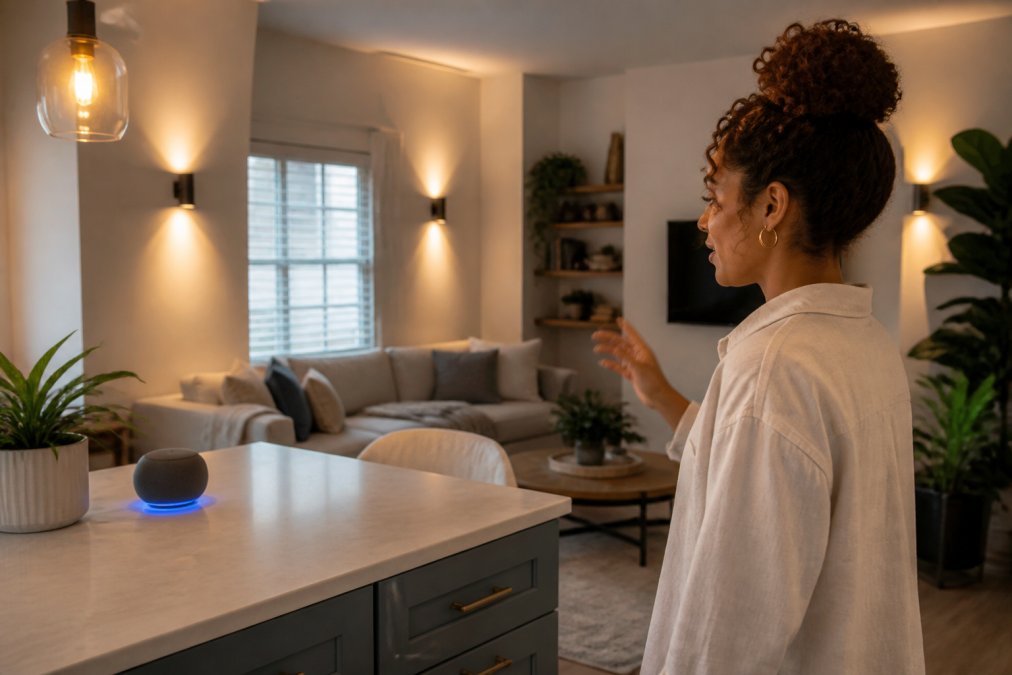
The Google Nest Hub Max stands out for beginners with its 10-inch HD touchscreen, built-in Google Assistant, stereo speakers, and integrated Nest Cam for home monitoring. Setup takes about 15 minutes and works with thousands of compatible products. The main limitation is the always-on camera and microphone, which raises privacy concerns for some users.
The Amazon Echo Show 8 (3rd Gen, 2023 release) offers similar functionality at a lower price point with an 8-inch HD screen and Alexa voice assistant. It includes a smart home hub for device control even when Wi-Fi drops. The tradeoff is ecosystem lock-in with Amazon services for optimal performance.
Both devices require wireless internet and work best in high-traffic areas like kitchens or living rooms.
Smart Home Security and Monitoring
Real security comes from actual monitoring capability, not just the appearance of security. The Ring Video Doorbell and Lockly Visage Zeno Series represent two different approaches to home protection.
The Ring Video Doorbell delivers 1080p HD video, two-way audio, advanced motion detection, and real-time alerts to your phone. Night vision works well for identifying visitors after dark. The catch: video recording and cloud storage require a Ring Protect Plan subscription. Without it, you get real-time alerts but no video history.
The Lockly Visage Zeno Series uses facial recognition and PIN Genie technology that scrambles keypad numbers. Facial recognition data stays encrypted and stored locally on the lock itself, addressing privacy concerns about cloud-based systems. The major limitation is the steep price point and possible professional installation costs.
Neither device is a complete security solution alone. Ring works best paired with other cameras covering your home's perimeter. Lockly works best for homeowners who already have other security measures in place. The real decision comes down to whether you prioritize monitoring (Ring) or access control (Lockly).
How to Choose Smart Home Gadgets That Match Your Needs
The biggest mistake buyers make is treating smart home gadgets as standalone purchases. Each device works better when it connects to others, which means your choice of one gadget influences what you can add later. Start by deciding which voice assistant ecosystem you'll use, Google, Amazon Alexa, or Apple Siri, because this decision locks you into compatible devices.
Google Assistant works with the broadest range of third-party devices, making it the safest choice for maximum flexibility. Alexa has the deepest integration with Amazon services and the largest ecosystem of compatible smart home products. Apple's ecosystem is smaller but offers the strongest privacy protections and works seamlessly if you already own iPhones, iPads, or Macs.
Next, identify the specific problems you want to solve. Do you want to save time on daily chores? Start with a robot vacuum. Do you want better energy efficiency? Smart thermostats and lighting make sense. Do you want peace of mind about home security? Video doorbells and smart locks address different aspects of that concern.
Before buying, check the product's compatibility list and confirm it works with your chosen ecosystem. This prevents the frustration of buying gadgets that don't talk to each other. Installation difficulty varies widely, some devices plug in and connect via Wi-Fi in minutes, while others require running new wiring or professional installation. Factor installation costs into your budget, not just the device price.
Gadgets That Save Time at Home
Time-saving gadgets work best when they automate tasks you actually do regularly. The Narwal Flow Robot Vacuum and Mop handles both vacuuming and mopping simultaneously. The FlowWash technology scrubs at 110 passes per minute with heated water at 113°F, tackling stubborn stains that regular mopping misses. The dual RGB cameras and AI obstacle avoidance mean it navigates your home without getting stuck or damaging furniture.
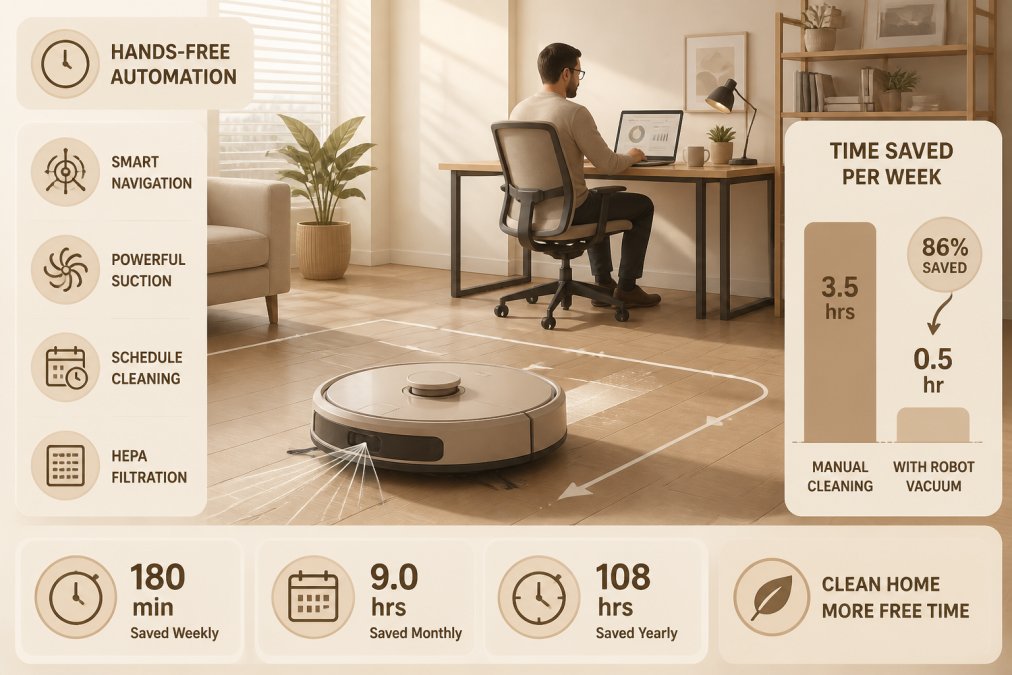
The real benefit is hands-free cleaning. Set the device on a schedule, and your floors get cleaned automatically while you work or relax. The 6400mAh battery provides extended runtime for most homes in a single charge. The main limitation is maintenance, water tanks need regular cleaning and mop pads require replacement.
Smart lighting systems like Philips Hue offer automation beyond convenience. Set schedules so lights turn on automatically when you wake up or turn off when you leave home. Automation routines handle multiple devices with a single command, "Good Morning" can turn on lights, adjust your thermostat, and start your coffee maker if it's compatible. Bulbs start around $15-$20 with starter kits around $70-$100.
Privacy and Interoperability: What Actually Matters
Privacy concerns exist because many smart home devices collect data about your daily routines, when you're home, and your preferences. Some companies encrypt this data locally on the device. Others send it to cloud servers or sell anonymized data to third parties.
Interoperability is equally critical and often overlooked. A smart device that only works with one ecosystem limits your future options. If you buy a smart light that requires Google Home and later decide you prefer Alexa, you're stuck. This is why choosing your primary ecosystem early matters so much.
The best devices prioritize both privacy and flexibility. Look for products that allow local control via Bluetooth or Wi-Fi without requiring cloud connectivity for basic functions. Check the privacy policy before buying, it reveals whether your data gets shared with third parties. Many manufacturers now offer encrypted local storage as a selling point because consumers increasingly demand it.
Real interoperability means a device works with multiple voice assistants, not just one. Some devices support this through separate apps or bridges. Others use Matter, a new standard designed to improve cross-platform compatibility. If a device supports Matter, it's more likely to work with your ecosystem of choice and less likely to become obsolete if you switch platforms later.
Why Trending Doesn't Always Mean Worth It
A gadget trending on social media often gets attention because it's novel or visually interesting, not because it solves a real problem. The best trending home gadgets earn their status through actual utility and long-term reliability.
Durability matters more than specifications. A robot vacuum that works flawlessly for six months but then fails isn't a bargain at any price. Check user reviews specifically for long-term reliability, not just initial impressions. Look for mentions of customer support quality and warranty coverage.
Cost-effectiveness requires honest calculation. A gadget that costs $300 but saves you five hours per week is worth more than one that costs $100 but saves 30 minutes monthly. Factor in maintenance costs, subscription fees, and replacement parts when evaluating the total investment. The ecosystem compatibility question determines whether a single purchase becomes the foundation for future upgrades or a dead-end investment.
Conclusion
The best trending home gadgets solve real problems, integrate with your existing ecosystem, and deliver value over months and years, not just in the first few weeks. Smart displays work as excellent starting points for beginners. Robot vacuums and mops save genuine time for busy professionals. Security devices like Ring and Lockly provide peace of mind through different approaches. The key is matching gadgets to your actual needs and ensuring they work together as a cohesive system.
Johnny Kash & Carry Co. specializes in bringing you trending gadgets that deliver real value, with up to 45% off popular items, fast tracked shipping on every order, and secure Shopify-encrypted checkout. Our easy returns process means you can try gadgets with confidence, and our real support team is available seven days a week to help you choose the right products for your home. Start building your smart home ecosystem with gadgets that actually work, not just ones that look good on social media.
Frequently Asked Questions
Which trending home gadgets are actually worth buying in 2026?
Focus on gadgets that solve a specific problem you face daily. Smart displays like the Google Nest Hub Max and Echo Show 8 work well for central home control and voice commands. For cleaning, the Narwal Flow combines vacuuming and mopping seamlessly. Ring Video Doorbell provides affordable security monitoring. Philips Hue smart lighting offers energy savings and customization. The key: choose based on your actual routine, not just social media hype. Verify that the gadget integrates with devices you already own.
What are the best smart home devices for beginners?
Start with a smart display like the Amazon Echo Show 8 or Google Nest Hub Max, these serve as your central hub for voice control and smart home management. Add a smart lighting system such as Philips Hue for easy ambiance and energy control. A Ring Video Doorbell is an affordable entry point for home security. These three establish a solid foundation without overwhelming complexity. All three offer app-based controls, voice activation, and straightforward setup. Avoid buying too many devices at once; expand your ecosystem gradually as you identify what you actually need.
How do I know if a trending gadget will work in my space?
Check the product's dimensions and installation requirements before buying. Smart displays need a flat surface with power access; smart locks require compatible door frames; robot vacuums need clear floor space and low thresholds. Read reviews specifically mentioning small spaces or apartments, these reveal real-world fit. Test the app interface on the retailer's website or in a store demo if possible. Ask whether the gadget requires a hub or bridge device, as this affects setup complexity. Consider your home's layout: open-plan spaces suit central smart displays, while multi-room homes benefit from distributed smart lighting.
Do I need to buy from the same brand for everything?
No, but compatibility matters more than brand matching. Google Nest, Amazon Alexa, and Apple Home Key devices can work together through interoperability standards, though each ecosystem has its strongest features. The Lockly Visage Zeno Series, for example, supports Apple Home Key, Alexa, and Google Home. Philips Hue lights work with all three major voice assistants. Before purchasing, verify that your chosen gadget connects to the voice assistant you already use. Mixing ecosystems is fine, just check compatibility specs first to avoid buying something that won't integrate with your existing setup.
This article was written using GrandRanker