
Table of Contents
- Why Finding Reliable E-Commerce Sites Matters
- How to Check If a Website Is Legit
- How to Spot a Fake Online Store
- Tools to Check Website Reputation
- Evaluating Trust Signals and Customer Reviews
- Payment Gateway Integration and Checkout Security
- Verifying Inventory, Shipping, and Fulfillment
- Your Checklist for Shopping Safely Online
Last Updated: August 27, 2026
Why Finding Reliable E-Commerce Sites Matters
Shopping online offers convenience and access to products you can't find locally. But that same openness creates risk. Fraudulent sites, counterfeit products, and payment theft cost consumers billions annually (fbi.gov). The ability to find reliable e-commerce sites is a financial protection strategy.
When you shop on an unreliable platform, you expose yourself to identity theft, credit card fraud, and loss of money and merchandise. Many shoppers don't realize they can verify a site's legitimacy before entering payment information. The good news: identifying trustworthy online retailers follows a predictable pattern. Legitimate businesses leave digital fingerprints, security certificates, clear policies, authentic reviews, and transparent contact information. This guide walks you through seven verification steps that separate genuine e-commerce operations from scams.
How to Check If a Website Is Legit
A real online store shows its credentials upfront. You're looking for specific signals that indicate professional operation and customer protection.
Verify SSL Certification and Security Protocols
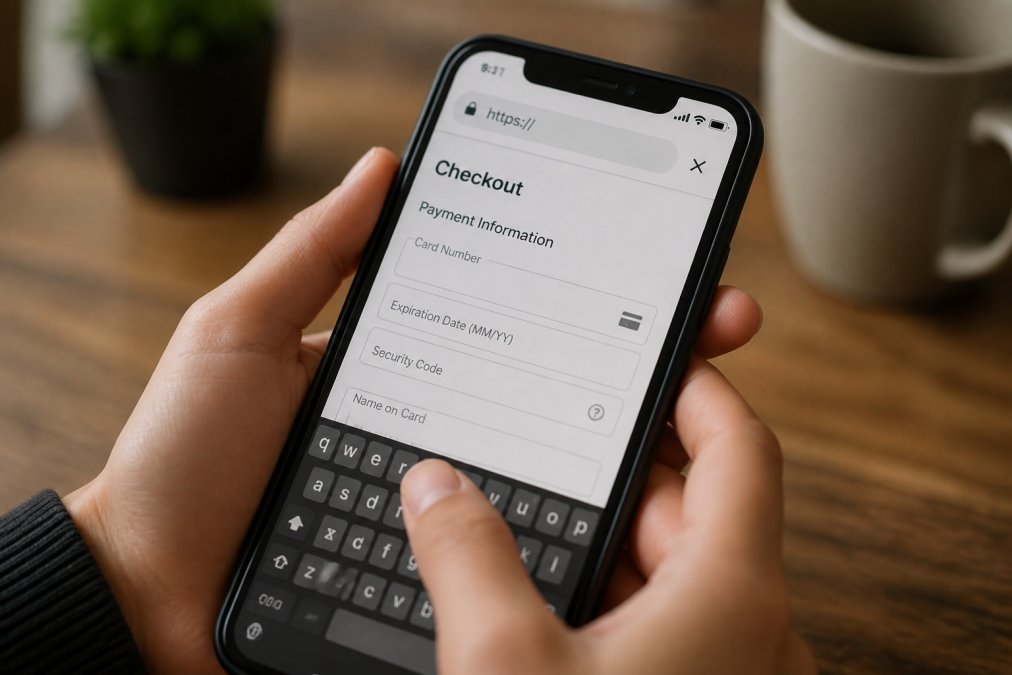
An SSL certificate is the baseline security requirement for any legitimate e-commerce site. When you see a padlock icon in your browser's address bar and a URL starting with "https://" (not "http://"), the site uses encryption to protect your data during transmission.
Check the padlock icon by clicking it. Your browser will display certificate details including the issuing authority and expiration date. Expired certificates are a major red flag. Many scam sites skip this step entirely because SSL certificates require verification and cost money.
Beyond the padlock, look for security seals from recognized providers like Norton, McAfee, and Trustwave. Click on them to verify they link to the actual security provider's website, as scammers sometimes fake these badges.
Real e-commerce platforms use tokenization, which prevents your full payment card number from being stored on their servers. Your payment information gets processed through a secure payment gateway, a third-party system designed specifically to handle sensitive financial data safely. This separation means even if a scammer hacks the retailer's database, they won't find your credit card number.
Look for Clear Contact Information and Return Policies
Legitimate businesses make it easy to contact them. A real online store displays multiple contact methods: a physical mailing address, phone number, email address, and often a contact form. Scam sites frequently hide contact information or provide only an email address.
Check the physical address on Google Maps to see if a real business operates there. Legitimate retailers will have a verifiable location, even if they operate primarily online.
Return policies reveal a business's confidence in its products. Stores that stand behind their merchandise offer clear, customer-friendly return terms. Legitimate retailers typically allow returns within 30-90 days with minimal hassle (the FTC). Extremely restrictive policies suggest the business doesn't expect customers to be satisfied.
Johnny Kash & Carry Co. maintains transparent policies because we stand behind our products. Easy returns and real support available seven days a week build trust with our customers.
How to Spot a Fake Online Store
Scammers often use tactics that seem professional at first glance but reveal themselves under scrutiny.
Red Flags in Product Listings and Pricing
Suspiciously low prices are the most common lure. If a trending gadget that costs $50 elsewhere appears for $5, that's not a bargain, it's a warning. Real discount retailers like Johnny Kash & Carry Co. offer competitive pricing with discounts of up to 45% off, but prices remain realistic relative to market value.
Examine product photos carefully. Legitimate retailers use professional photography or clear images of actual products. Scam sites frequently steal photos from legitimate retailers. Reverse image search using Google Images helps you identify stolen photos, upload a product photo and Google shows you where else that image appears online.
Product descriptions with spelling errors, awkward phrasing, or poor grammar are red flags. Legitimate businesses invest in professional product copy. Vague specifications like "one size fits all" or minimal information suggest low quality.
Suspicious Domain Names and Website Design
Domain age matters. Scammers register new domains, operate briefly, collect payments, then disappear. Check a domain's age using WHOIS lookup tools, which reveal when a domain was registered and its ownership details. Domains registered within the last few months warrant extra scrutiny.
The domain name itself can reveal intent. Scammers often use variations of legitimate brand names: "amazn-store.com" instead of "amazon.com." Read the domain carefully character by character.
Website design quality reflects business professionalism. Legitimate e-commerce sites feature clean layouts, professional graphics, and functional navigation. Scam sites often have outdated designs, broken links, or poor navigation. Check for consistent branding throughout, does the site logo appear consistently? Are colors and fonts uniform?
Tools to Check Website Reputation
Several free and paid tools help you verify a website's legitimacy before you shop.

Better Business Bureau (BBB) maintains a database of complaints against businesses. Search for a company on BBB.org and you'll see its rating, complaint history, and how the business responds to issues. A+ rated businesses have few complaints and resolve issues responsibly.
Trustpilot aggregates customer reviews from real shoppers. Unlike reviews on a retailer's own website, Trustpilot reviews come from an independent platform, making them harder to fake. Look at the overall rating and read recent reviews for patterns in complaints.
ScamAdviser analyzes websites for fraud indicators and assigns a trust score. Sites with trust scores below 40% warrant caution.
Google Safe Browsing flags sites that distribute malware or host phishing attacks. Type a URL into Google's Safe Browsing tool to check if Google has flagged that site as dangerous.
WHOIS lookup tools reveal domain ownership and registration details. Services like WHOIS.com show when a domain was registered, who registered it, and when the registration expires. Domains registered recently, with hidden ownership information, or expiring soon are suspicious.
Evaluating Trust Signals and Customer Reviews
Trust signals tell you whether other customers had positive experiences and whether the business operates transparently.
Where to Find Authentic Customer Feedback
Customer reviews provide the most honest assessment of a retailer's reliability. Real customer feedback appears on independent platforms where reviewers have no financial incentive to lie.
Google Reviews shows feedback from customers who made verified purchases. When you search for a business on Google Maps, the reviews section displays ratings and comments.
Trustpilot specializes in collecting verified customer reviews. The platform requires reviewers to confirm their email address. Read the most recent reviews first, as they reflect the current state of the business.
Amazon reviews come from verified purchasers and display a "Verified Purchase" badge next to reviews from customers who actually bought the item.
Industry-specific review sites like Yelp, Capterra, and G2 focus on particular product categories and have their own verification systems.
Identifying Fake Reviews and Inflated Ratings
Fake reviews often appear in clusters. A site might have no reviews for months, then suddenly receive dozens of five-star reviews in a single week. Real customer feedback comes gradually and naturally.
Read review text carefully. Fake reviews often use generic language: "Great product!" Real customers provide specific details about their experience, mentioning particular features or explaining why they recommend or don't recommend a product.
Check reviewer profiles. Legitimate reviewers have multiple reviews across different businesses and time periods. Accounts that only review one company are suspicious.
All five-star ratings are another red flag. Real customer bases always include some dissatisfied customers. Natural rating distributions include a spread of mostly positive with some critical reviews mixed in.
Payment Gateway Integration and Checkout Security
The checkout process is where your financial information becomes vulnerable. Legitimate e-commerce sites use established payment gateways like Stripe, PayPal, Square, and Authorize.net. These companies invest heavily in security and fraud detection. When you checkout on a legitimate site, you're often redirected to the payment gateway's secure environment.
Watch for payment method variety. Legitimate retailers accept multiple payment options: credit cards, debit cards, PayPal, Apple Pay, and Google Pay. Scam sites often accept only wire transfers, cryptocurrency, or gift cards, payment methods that are difficult to reverse if fraud occurs.
Before entering payment information, verify the URL hasn't changed. Check that the URL still belongs to the retailer and the padlock icon remains visible. Never proceed with payment if the URL changes to an unfamiliar domain.
Look for payment security badges during checkout. Click the badge to confirm it links to a real security provider's website.
Verifying Inventory, Shipping, and Fulfillment
Scammers often claim to have products in stock when they don't. Check inventory status before purchasing. Real e-commerce sites display whether items are in stock, pre-order, or out of stock.
Shipping information reveals fulfillment practices. Johnny Kash & Carry Co. offers fast, tracked shipping on every order, giving customers full visibility of order status. Legitimate retailers provide tracking numbers immediately after shipping and use established carriers like UPS, FedEx, or USPS.
Shipping times should be realistic. Domestic shipping typically takes 3-7 business days for standard service (usps.com). Extremely fast promises suggest the site isn't actually fulfilling orders.
Real retailers provide clear return instructions, including where to ship items and how long refunds take. Scam sites either have no return process or make returns so difficult that customers give up.
Your Checklist for Shopping Safely Online
Use this checklist before making a purchase on any unfamiliar e-commerce site:
| Verification Step | What to Check | Red Flag |
|---|---|---|
| Security | HTTPS URL + padlock icon visible | HTTP URL or missing padlock |
| Contact Info | Physical address, phone, email displayed | Only email or no contact method |
| Domain Age | Registered 2+ years ago via WHOIS | Registered within last 3 months |
| Product Photos | Professional, original images | Blurry, stolen, or missing photos |
| Pricing | Realistic compared to market | Suspiciously low prices |
| Reviews | Multiple verified reviews on independent sites | No reviews or only 5-star ratings |
| Payment | Established payment gateway (Stripe, PayPal) | Wire transfer or cryptocurrency only |
| Shipping | Tracked shipping with realistic timeframe | No tracking or unrealistic speed claims |
| Return Policy | Clear, customer-friendly terms | Restrictive or hidden policy |
| Business History | BBB rating or established reputation | New domain with no history |
Before checkout, ask yourself: Does this site display the trust signals of a legitimate business? Can I verify the company exists? Are reviews authentic and detailed? If you answer no to any of these, shop elsewhere.
Finding reliable e-commerce sites requires attention to detail, but the effort protects your money and identity. The verification steps in this guide, checking security certificates, reviewing authentic customer feedback, confirming inventory practices, and evaluating payment security, work together to identify legitimate retailers. When you shop on verified, trustworthy sites like Johnny Kash & Carry Co., which offers secure checkout protected by Shopify encryption and real support available seven days a week, you gain confidence that your purchase and personal information are protected. Start with these seven verification steps on your next online purchase, and you'll develop the instinct to spot red flags instantly.
Frequently Asked Questions
How can you tell if an online store is legitimate?
Check for an SSL certificate (padlock icon in the browser address bar), verify contact information and a physical address, read customer reviews on independent sites, and confirm the merchant account is registered. Legitimate e-commerce sites display clear return policies, offer multiple payment options, and provide transparent shipping information. Look for professional website design and consistent branding across all pages.
What are the signs of a fake e-commerce website?
Fake online stores often have poor spelling and grammar, suspicious domain names that mimic legitimate brands, extremely low prices compared to competitors, no contact information or vague return policies, and low-quality product images. They may also lack SSL certification, have outdated website design, offer only cryptocurrency payments, and show pressure tactics like fake scarcity or urgency claims. Avoid sites with no customer reviews or only five-star ratings.
What tools can I use to check a website's reputation?
Use WHOIS lookup tools to verify domain age and registration details, check Better Business Bureau ratings for merchant verification, review Google Safe Browsing to detect malware, and use Trustpilot or Sitejabber for independent customer reviews. SSL certificate checkers confirm security protocols are active, and reverse image searches reveal if product photos are stolen. Google Search Console and domain reputation tools show whether a site has been flagged for fraud or security issues.
Is it safe to buy from a website I've never heard of?
Yes, if you verify legitimacy first. New e-commerce sites can be trustworthy if they have SSL certification, clear contact information, responsive customer support, and transparent policies. Check their domain age using WHOIS lookup, read third-party reviews, confirm they use secure payment gateways, and start with a small purchase. Avoid sites with no reviews, suspicious pricing, or poor website design. Always use a credit card rather than debit for better fraud protection.
This article was written using GrandRanker